Connection getting slow on my eSIM
Slow internet can be caused by network congestion, signal issues, or device problems. If your eSIM allows it, try switching to another network for potentially better service. Check out these simple ways to fix your slow internet speed on your eSIM:
1.
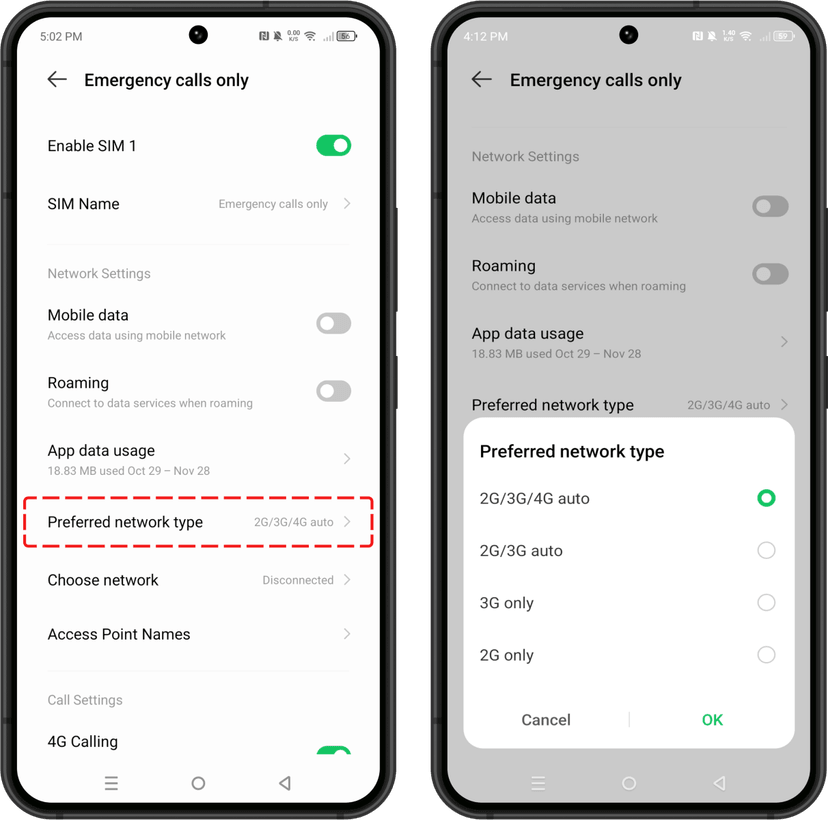
Switch network mode
Check the supported network type on your device (2G, 3G, 4G, or 5G). Then try switching the “network selection” or “voice & data” from default to other options either lower or higher. Then, wait for several minutes and select back to the network you preferred.
2.
Change the network selection or operators
3.
Restart your device
4.
Reset network settings


Superalink is a provider of digital SIM (eSIM) services for travelers going abroad. Enjoy internet access anytime without the hassle of swapping physical SIM cards — Scan, Connect, and Go Online.
GADGET SG PTE. LTD. | CEO: Yu Sang Hyeok | 8 TEMASEK BOULEVARD #42-01 SUNTEC TOWER THREE SINGAPORE (038988)
Seoul Office Address: 22nd and 9th floor, Magok Jungang 5-ro, Gangseo-gu, Seoul
Bangkok Office Address: 32F, 399 Sukhumvit Rd, Khlong Toei Nuea, Watthana, Bangkok 10110, Thailand
Jakarta Office Address: PT. Altero Digital Lab | District 8, SCBD, Prosperity Tower 56F, Jl. Jend. Sudirman No.Kav 52-53 Lot. 28, Jakarta, Daerah Khusus Ibukota Jakarta 12190
© Copyright 2026, All Rights Reserved Superalink.